AI Dance GeneratorCreate AI dance videos from photos and avatars
Turn a portrait, avatar, anime character, mascot, or pet photo into a short dance clip. Use a reference dance video for tighter motion control, or switch to prompt mode for a faster one-image workflow.
Last updated March 27, 2026
Estimated cost: 10.0 credits
Result
Dance job preview
Generate a dance clip from one image
Use a reference dance video for reliable motion transfer, or switch to prompt mode for a fully prompt-driven dance generation flow.
Answer First
AI dance generator lets you make an AI dance video from one photo
Upload a portrait, avatar, anime character, mascot, or pet image, then choose either reference-video motion transfer or prompt-driven generation. The workflow is built for short-form publishing, with reference clips limited to 3 to 30 seconds, source images capped at 10MB, and entry pricing starting at 10 credits per generation.
Best inputs
Portraits, avatars, anime characters, mascots, and pets
Generation modes
Reference-video motion transfer or prompt-only dance generation
Reference clip limit
3 to 30 seconds
Upload image limit
10MB JPG or PNG
Starting cost
10 credits per generation
Best output channels
TikTok, Reels, and YouTube Shorts
Visual inspiration
Image styles that usually convert into stronger dance clips
Clear body framing, contrast, expressive clothing, and stylized characters tend to survive motion generation better than cluttered or low-detail source images.
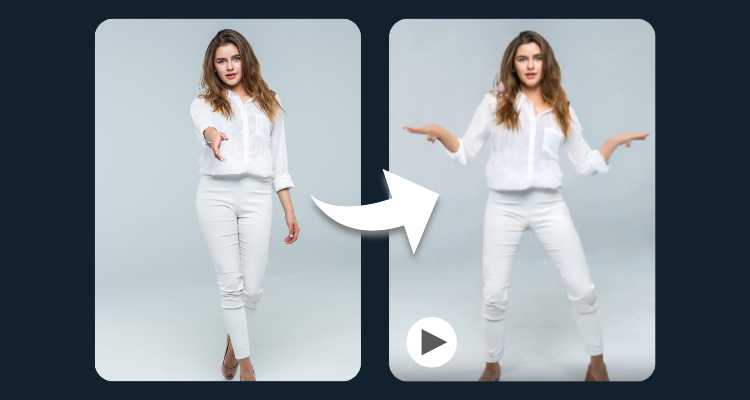
Anime and stylized character inputs
Stylized faces, vivid wardrobes, and clean silhouettes usually produce the strongest dance-ready motion.
Why This Workflow Works
Why creators use this workflow for short-form dance videos
The strongest AI dance results usually come from simple inputs, clear subjects, and short-form output goals. If you want to turn one image into a motion-heavy clip without building a full animation pipeline, this workflow is the fastest place to start.
Works from one image
You can start with a single portrait, avatar, mascot, anime character, or pet photo and turn it into a dance-ready clip.
Made for short-form video
The workflow is best suited to TikTok, Reels, and Shorts where fast, visual motion clips perform well.
Better control with a reference clip
Use a reference dance video when you want more reliable movement, or switch to prompt mode for a simpler one-image flow.
Good for creators and fast experiments
It works well for fan edits, meme content, promo concepts, and quick social video tests without a complicated production setup.
Other ways people describe the same workflow
If you are comparing tools or exploring different wording, these terms usually point to the same core task: turning one image into a short dance-ready video.
Start from a single image
You do not need a full video shoot. A clear portrait or character image is enough to begin.
Pick the level of control
Use a reference clip for more precise movement, or prompt mode for a simpler, faster generation flow.
Built for social formats
The strongest use cases are still short-form edits, fandom clips, meme content, and quick promo ideas.
How To Choose
Which dance workflow should you use?
If you are unsure whether you need a direct generator, a more technical image-to-video flow, or a consumer-style photo dance tool, use this quick guide to choose the fastest path.
| If you want to... | Best choice | Why |
|---|---|---|
| I want to turn one photo into a dance video fast | Use AI Dance Generator | This is the most direct path if you already know you want a tool and want to start generating immediately. |
| I am exploring what an AI dance video actually is | Start here, then try the generator | This page now covers both the explanation and the working tool, so you do not need to jump between duplicate pages. |
| I specifically want an image-to-video style workflow | Use this page or Image to Dance Video | Both fit the same outcome, but the supporting page uses more technical wording for that conversion flow. |
| I want to animate a selfie, portrait, or pet photo | Use this page or Photo Dance AI | Those terms are more consumer-friendly, but the generation workflow is still the same underneath. |
AI dance generator FAQ
What does an AI dance generator do?
An AI dance generator turns a photo, avatar, or character into a generated dance clip using motion synthesis, animation presets, or video generation models.
Can I make an AI dance video from a single photo?
Yes. Upload one portrait, character, mascot, or pet image, then use either a reference dance clip or prompt mode to render a short AI dance video.
Who searches for AI dance generator?
Most users want to create a short entertainment clip for TikTok, Reels, Shorts, fan edits, meme content, or avatar marketing assets.
What is the difference between AI dance generator and AI dance video?
The intent is very close. AI dance generator is more tool-specific, while AI dance video is broader and can also include tutorial, inspiration, or comparison intent.
Can I use an AI dance generator for anime characters?
Yes. Anime, stylized avatars, mascots, and pets are common inputs because they are visually distinctive and often work well in short-form content.
Can I use these dance videos for TikTok and Reels?
Yes. Most creators publish vertical clips to TikTok, Instagram Reels, and YouTube Shorts because that is where AI dance content performs best.